Why do I use Vim?
Update 2023: Many things have changed since I wrote this post 9 years ago. After 4 years of using Vim, I switched to Emacs with different flavors for another 4 years. At the moment, I’ve settled with VS Code and Vim extension.
Ok, it’s not a new topic. This article came up when I paired with my colleagues and saw how they used some text editors unproductively. If you’re already a Vim user, there is nothing new. Otherwise, you may find some interesting features that convince you to use Vim. Frankly, I’m not a Vim expert, but a guy who has used it for several years and is still surprised by Vim’s possibilities.
I’m not going to tell you how to start or learn Vim, there are a lot of tutorials available and good books just to teach you how to use Vim.

Productivity
The first thing we should think of is certainly coding productivity. The developer is most productive in his favorite editor, as people always say. Why do we have to care about (yet) another text editor? I’d say that my productivity has doubled since I switched to Vim two years ago. So, what is Vim’s unique feature that can double your coding speed?
The salient part has to be Vim key bindings. In most circumstances, Vim encourages users not to use the mouse but the keyboard as the input device only 1. It happened because Vim’s origin is Vi, an editor that was born at a time when most computers had no mouse and not even arrow keys on the keyboard.

Well, it looks like you are using an old-school editor. However, when your fingers are tightly on the keyboard, focusing only on typing without distraction of moving the mouse around the screen to find something to click unconsciously, you’re likely to feel Vim’s way. I would say my productivity is doubled with key bindings compared with my previous text editors.
It’s not easy at first to write or code without a mouse and arrow keys, but you have to take 1 step back in order to have 2 steps forward in this case.
In addition, there are tons of ready-to-use plugins to support syntax highlighting, code completion, code formatting, folding, etc., which certainly make our programming life happier 2.
Unique Vim
Vim educates its users to customize it as much as they want.
Have you ever thought of using a text editor over whose features you have full control and which you can improve whenever possible. Probably not. If yes, Vim is surely your way to try. The Vim core gives us not so many out-of-the-box features, but its flexibility is the way that Vim can be seen as one of the most powerful text editors. When I started using Vim, I constantly found myself needing to improve every bit of key bindings, try some plugins, and tweak them to work as I expect. Eventually, it led to the fact that every Vim user has his own specific key bindings and combinations of plugins which he thinks is the most reasonable way to use. So it’s not someone’s text editor, it’s your own text editor to improve, to write, to code, and to be proud of. From time to time, you recognize that you can actually program a plugin for Vim. Writing code is a unique activity which I think is worth a unique tool like Vim to work with.
GUI, please!
The purpose of a GUI is to make simple things simpler and complex things impossible.
Vim can run on most popular OSes out there 3. No matter where you work, a Graphical User Interface (GUI) or the command line, Vim is always the same. Thanks to Vi. Whenever I need to work on DevOps tasks, it would be horrible without Vim available. Often, when editing documents on servers, you will have the same comfort as writing code on a desktop if Vim is your editor.
Drawbacks
Not everything is perfect, nor is Vim. It’s widely known that Vim has a steep learning curve that may use up all your patience when trying to adapt to it.
I would say it’s true if you’ve never left the GUI environment before. The barrier mostly comes from the weird key bindings and vimscript which you need to invest time to learn to use.
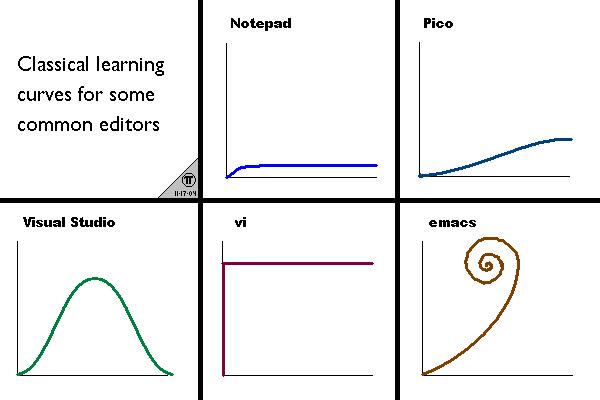
This figure may not be 100% accurate, but it gives you a sense of how challenging your Vim learning journey would be.
Conclusion
My point is not to convince programmers that they need to make a switch right away when their daily jobs are tied to a single, monolithic Integrated Development Environment (IDE) such as .NET or iOS developers with Visual Studio or Xcode.
Generally, IDEs have their own advantages in code generation or advanced debugging when you actually need to use them.
After learning Vim for some time, the possible solution is to apply Vim key bindings to your favorite text editor (or IDE) and remember how slow you were without Vim key bindings.
As for Vim, I think every programmer should give it a try. If you’ve never used Vim, then forget the first time you wrote a document on a computer, pretend that your mouse is away from your handside, learn it bit by bit. It’s a worthwhile experience.
Footnotes
- Tags:
- random